
This video walks you through the key points, it’s the best way to understand everything in just a couple of minutes.
Further Reading
You can accept registrations individually or in bulk using the Enroll action in the Registrations tab on TUIO.
Accepting an Individual Registration
- Review the Registration
Click the registration number to open the form. From there, you can review:- General information
- Form details
- Related invoices
- Enroll the Student
When ready, click the three-dot menu on the registration and select Enroll. - Choose the Program
Select the Program you are enrolling the student into. - Customize the Notification (optional)
- Add a custom message to the parent or leave it blank to use the standard system notification.
- Select any organization accounts to be copied on the “Registration Accepted” email.
- Leave Notify parent unchecked if you don't want to send a notification.
- Confirm Enrollment
- Click Enroll & set payment plan/discount to proceed with inviting the parent to set up payments.
- Or click Enroll if you wish to complete the payment setup at a later time.
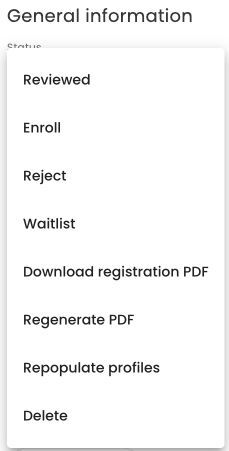
Open a registration and choose Options > Enroll after reviewing its information.
Accepting Registrations in Bulk
- Select Registrations
Choose multiple registrations (e.g., all Wait Listed students who are now ready to be enrolled). - Bulk Enroll
Use the Bulk Actions tool at the bottom of the page and select Enroll. - Choose Your Action
- Enroll & set payment plan to immediately invite parents to set up payments.
- Or Enroll to complete the setup later.
All selected students will be enrolled in the chosen Program, and their registration status will update to Enrolled.