
The video may show an earlier filter layout. Use the current steps below.
Bulk Edit Invoices on TUIO
Once you're familiar with editing individual invoices, you can save time by making changes to multiple invoices at once using TUIO's bulk edit feature.
How to bulk edit invoices
- Open Invoices. Check the selected organization and use the inline filters to narrow the list.
- Open More filters for additional criteria, such as Invoice due date. Use Search when you need a particular family.
- Select the invoices you intend to change. Check the selected count and records before continuing.
- Choose Actions > Edit. When editing several invoices, select the fields to change, then choose Next.
- Enter the new values. Only fields available for the selected invoices can be edited. Depending on the selection, these can include Name, Line item detail, Price, Issue date, Posted date, Due date, Discounts and Product GL accounts.
- Review the changes and choose Save to apply them, or Cancel to leave the invoices unchanged.
GL account changes
If GL accounts are enabled and available for your selected invoices, use Product GL accounts for the product mapping. Default GL accounts must be configured before mappings can be set. See Setting Up Your GL Accounts in TUIO.
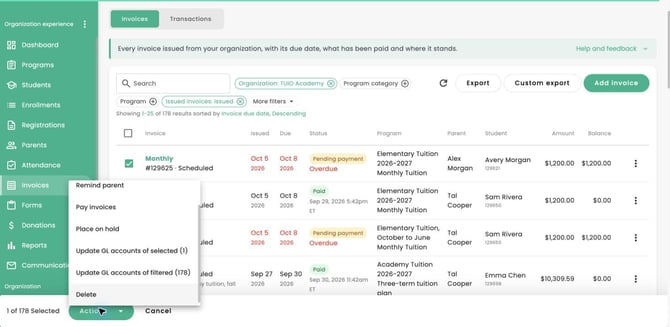
The separate bulk actions for updating GL accounts distinguish the selected invoices from all filtered invoices. Check the count in the action label before choosing one.
Review the results after a bulk GL update. Some records can succeed while others fail. Check the failed records and their messages before retrying; do not assume the entire selection failed. See the GL setup guide for mapping and scope guidance.
Check selected and filtered GL counts
The example shows one selected invoice and 178 filtered invoices. The two GL actions affect different sets of invoices. Read the action label and count before choosing.