

Video walkthrough
Further Reading
Form targeting in TUIO makes it easy to distribute forms to the right parents and collect important information about students and families. Once a form is targeted and sent, parents automatically receive an email notification prompting them to complete it.
Getting Started
- Navigate to the Forms tab.
- Click on the name of the form you’d like to send.
- Configure the form’s Targeting settings before notifying parents.
How Form Targeting Works
The parent assigned to each targeted enrollment receives the form. A parent is not included simply because they are also linked to the same student. Check the form’s Details page for its recipient explanation.
Forms are automatically grouped either by Parent or by Student:
- If the form includes at least one student-related field, it will be assigned per student (one form per student).
- If there are no student fields, the form will be assigned per parent (one form per eligible parent, regardless of the number of targeted enrolled students).
Targeting Options
In the Targeting section, choose from:
- All Programs – Sends the form to the parents assigned to the targeted active enrollments across programs.
- Selected Program(s) – Sends the form to the parents assigned to targeted active enrollments in the specified program(s).
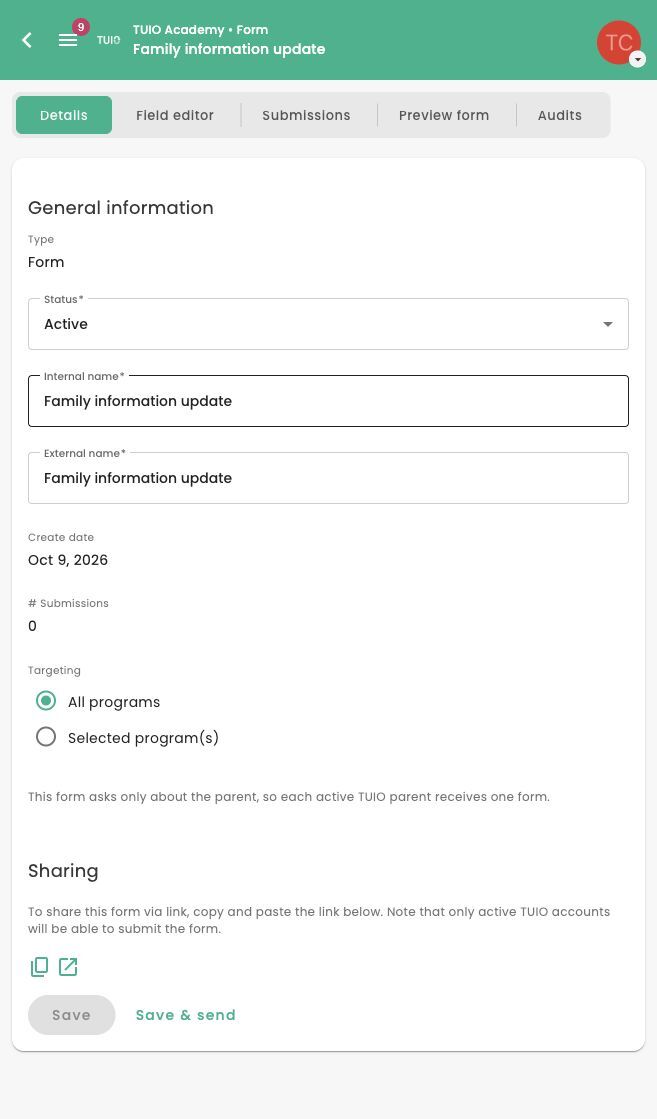
TUIO ensures that:
- Parents or students who have already completed the form will not receive it again.
- A newly added eligible parent can receive the form on the next send. Review enrollment ownership and targeting when a parent is missing from the audience. Reusing the form lets you reach newly eligible recipients over time.
Sending the Form
Once you've configured your targeting options:
- Click Save & Send to deliver the form to the selected audience.
- Parents will receive an email notification with a link to complete the form. It will also appear in their Parent Portal.
Tracking Submissions
After the form has been sent, you can monitor completion progress anytime by visiting the Submissions tab within the form.